
Fieldy - AI note taker
Field Labs IncLifestyle
4.4132.00 Reviews
- Version
- 2.40
- Installs
- 10.00K
- Age Rating
- Everyone
Screenshots
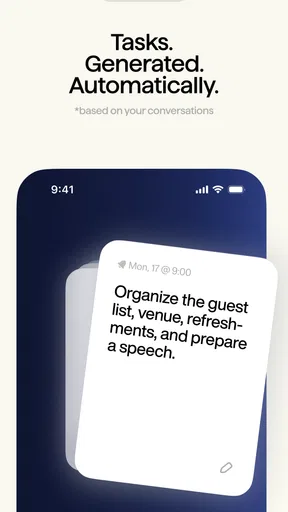
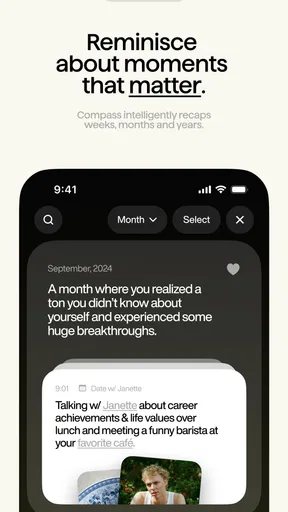
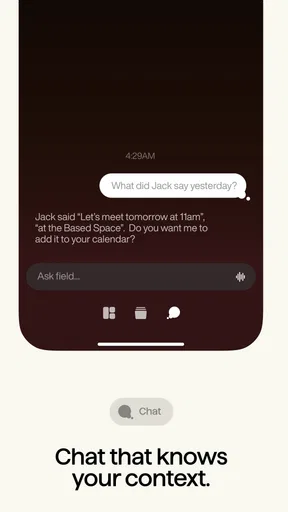
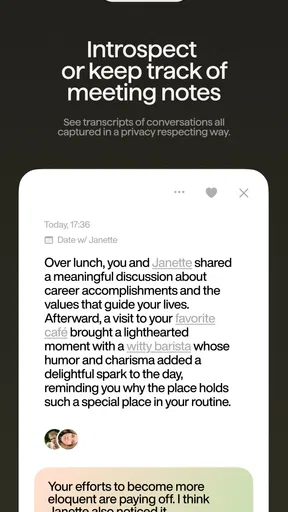
Our Review of Fieldy - AI note taker
 Analysis by Appyee
I often reach the end of a busy day with a handful of half-finished thoughts and no clear idea where I wrote them down. That is the problem an AI note taker is meant to ease, and Fieldy - AI note taker is aimed at people who want spoken information turned into something they can revisit. I would consider it less a replacement for careful note-taking than a way to reduce the pressure of capturing every detail in real time.
What the free option tells you about cost
Fieldy is a free lifestyle app from Field Labs Inc, and it has a 4.0 average from around 400 ratings. That gives a prospective user a useful starting point: you can try the app without paying upfront. The app is rated for everyone, though that age label should not be confused with a promise that every recording situation is appropriate for every user.
There are in-app purchases, with items ranging from around five dollars to around 180 dollars. That is a wide spread, so I would check the particular purchase and its terms inside the app before committing. The existence of paid options does not by itself tell me which capabilities are free, what a purchase unlocks, or whether any payment is recurring. I would treat the free access as a chance to see whether the workflow suits me, not as proof that every useful feature is free.
What Fieldy is like to use
So, what's the scoop on Fieldy? It’s an app designed to make note-taking as effortless as possible. With its AI capabilities, it can not only transcribe but also organize your notes without you lifting a finger. Whether you're in a meeting, attending a lecture, or just brainstorming, Fieldy ensures you don’t miss a beat.
Making a recording fit a real routine
The strongest reason to try a speech-to-text tool is not that it eliminates thinking; it is that it can let you listen more attentively while a conversation is happening. For a project check-in, for instance, I could focus on what a colleague is saying and later use the transcript as a prompt to write a concise summary. I would still mark decisions and owners myself, because raw conversation text is not automatically a reliable action list.
A practical habit is to give each recording a clear, searchable title as soon as I finish it, then add a tag that reflects the project or topic. That small step can matter more than collecting a long archive: if I label a note “kitchen estimate” rather than “recording,” I have a better chance of finding it when I need to compare details later. I would also make a quick pass over names, figures, and deadlines, where a transcription slip could change the meaning.
The everyday trade-off is that recording is only useful when the people involved know it is happening and are comfortable with it. I would ask before recording a meeting or conversation, and I would avoid capturing private discussions casually. For sensitive work, I would first check the organization’s rules and the app’s current handling of recordings rather than assuming an AI tool is suitable just because it is convenient.
Where it sits beside ordinary notes and recorders
Compared with typing into a standard notes app, an AI note taker can be more useful when speech is the main source of information: a lecture, a planning conversation, or your own spoken brainstorm. A basic recorder, meanwhile, preserves the original sound and can be a better fallback when exact wording, tone, or speaker context matters more than searchable text. Neither option removes the need to review what was captured.
I would not choose Fieldy as my only place for polished documents or carefully structured project plans. A conventional notes app is usually the more direct choice when I already know what I want to write and need full control over headings, formatting, and edits. The appeal here is narrower: reduce the burden of turning spoken information into notes, then organize those notes enough to retrieve them.
Who is likely to get useful value
Students who want to revisit a lecture, people who regularly leave meetings with details to check, and anyone who thinks more clearly out loud are the clearest candidates. It could also help with practical errands: after a contractor visit, I might record the options discussed, then review the text at home before deciding what to ask next. In that situation, I would treat the transcript as a memory aid, not as a substitute for a written quote or agreement.
It is less suitable for someone who prefers handwritten notes, rarely records speech, or needs a transcript to be perfect without checking it. It may also be the wrong fit when a conversation is confidential or when participants cannot reasonably consent to recording. If I only need to jot down a short reminder, opening a plain notes app is faster and simpler than creating an audio note and managing its transcript.
What to check before relying on it
Before making Fieldy part of a regular routine, I would test it with a short, low-stakes recording in the kind of environment I expect to use. Then I would check whether the transcript is readable, whether the note is easy to find again, and whether the organization tools fit my own way of grouping information. A brief trial like this answers more than a feature list can: it shows whether the process is genuinely less work for me.
I would also think through the practical questions that affect daily use. If I need notes on another device, I would verify that my preferred sync route works for my account rather than assuming it will. If I plan to use it for classes or work, I would check recording rules first. And if a paid option looks attractive, I would inspect exactly what it includes and whether it is a one-time or recurring charge before confirming anything.
A measured buy-or-skip decision
Fieldy has over 10,000 installs and is currently at version 2.29, so it has an established presence while continuing to have a specific job: helping turn speech into notes. For me, its value depends on how often I have useful information arriving faster than I can write. Free access makes it reasonable to test that fit; the paid range means I would not buy anything until I knew which limit I was trying to solve.
If spoken conversations regularly leave you scrambling to remember details, I think Fieldy is worth trying with a few ordinary, consent-based recordings. If you mostly write short reminders, need a fully manual notebook, or cannot risk errors in an unreviewed transcript, I would skip it or choose a simpler alternative. The best use is as a first capture step: listen, record appropriately, review the text, and turn only the important parts into dependable notes.
Sleek and User-Friendly Interface
The first thing you'll notice about Fieldy is its clean, intuitive layout. The developers clearly put a lot of thought into making it user-friendly. I mean, who wants to waste time figuring out how to use an app when you have important notes to take, right? Navigating through the app feels smooth, and setting up your first note is a breeze. Just tap a button, and you’re ready to go!
AI-Powered Transcription
This is where Fieldy really shines. Imagine being in a meeting, and instead of scribbling furiously to keep up, you just hit record. The AI steps in, turning speech into text with impressive accuracy. It’s like magic! I’ve tried it in different settings, and the transcription quality holds up whether it's a quiet room or a bustling cafe.
Organizational Features
Once your notes are taken, Fieldy doesn’t just leave you hanging. The app offers smart organization features that help categorize and tag your notes. Need to find that specific point from last week’s meeting? No problem. A quick search, and there it is! The tagging system is particularly handy, letting you filter notes with ease.
Integration and Accessibility
Fieldy also plays well with others. It's compatible with popular platforms like Google Drive and Dropbox, so you can easily sync your notes across devices. This integration means your notes are accessible wherever you go, which is a lifesaver when you're on the move.
Customization Options
Another feature worth mentioning is the customization options. You can tweak the app’s settings to suit your preferences, whether it’s adjusting the transcription speed or choosing different organizational layouts. It’s these small touches that make Fieldy adaptable to different working styles.
Privacy and Security
In a world where data privacy is crucial, Fieldy takes your security seriously. The app ensures that your data is encrypted, giving you peace of mind that your notes are safe and sound. No need to worry about sensitive information falling into the wrong hands.
Final Thoughts
All in all, Fieldy - AI note taker is a game-changer for anyone who needs to capture and organize information on the fly. Its seamless functionality and intelligent features make it a must-have tool for students, professionals, or anyone with a busy schedule. So, if you're looking to streamline your note-taking process, give Fieldy a shot. Trust me, you won't look back!
Verdict
Strengths of Fieldy - AI note taker
- Efficiently transcribes meetings in real-time.
- Supports multiple languages seamlessly.
- Integrates with popular calendar apps.
- Offers cloud storage for easy access.
- User-friendly interface with intuitive design.
Limitations of Fieldy - AI note taker
- Requires a stable internet connection.
- Limited free version features.
- Occasional minor transcription errors.
- Heavy battery usage during long sessions.
- Premium features can be pricey.
Similar Picks in This Category
View All
SmartThings
Samsung Electronics Co., Ltd.4.6

Google Home
Google LLC4.0

Pinterest4.2

Astrotalk - Talk to Astrologer
Astrology & Horoscope4.7

My Verizon
Verizon Consumer Group4.5

Samsung Wallet (Samsung Pay)
Samsung Electronics Co., Ltd.4.1
Frequently Asked Questions
What is Fieldy - AI Note Taker?
Fieldy is an AI-powered application designed to simplify note-taking. It uses advanced algorithms to transcribe and organize your notes efficiently, making it ideal for students, professionals, and anyone who needs to capture information quickly and accurately. The app aims to boost productivity by allowing users to focus more on the content rather than the act of note-taking.
How does Fieldy ensure the accuracy of transcriptions?
Fieldy leverages cutting-edge AI technology to provide accurate and reliable transcriptions. It continuously learns and adapts to different accents and speech patterns, improving its accuracy over time. The app also allows for manual edits and corrections, ensuring that users can perfect their notes as needed.
Is Fieldy compatible with various devices and platforms?
Yes, Fieldy is available for both Android and iOS devices, ensuring a seamless experience across smartphones and tablets. The app's cross-platform functionality allows users to access and sync notes across multiple devices, providing flexibility and convenience whether you're at home, in the office, or on the go.
Does Fieldy offer any collaboration features?
Fieldy includes features for sharing and collaboration, making it easy for users to work together on projects. You can share notes with team members or classmates, allowing for real-time collaboration and feedback. This facilitates efficient teamwork and ensures that everyone is on the same page.
How does Fieldy handle user privacy and data security?
Fieldy takes user privacy seriously, employing robust encryption methods to protect your data. The app ensures that your notes and transcriptions are stored securely, with options for password protection and user authentication. Fieldy complies with data protection regulations, providing peace of mind for users concerned about privacy.
